> ## Documentation Index
> Fetch the complete documentation index at: https://dripart-matt-router-pricing-pika-and-guard.mintlify.site/llms.txt
> Use this file to discover all available pages before exploring further.
# Extension Settings
> Detailed description of ComfyUI extension management and setting options
The settings described on this page are located in the **ComfyUI in-app settings menu**. You can open it by navigating to **Settings** (gear icon) or using the `Ctrl + ,` keyboard shortcut, then select the corresponding category to view and configure these options.
The Extension settings panel is a special management panel in the ComfyUI frontend settings system, specifically used to manage the enable/disable status of frontend extension plugins. Unlike Custom Nodes, this panel is only used to manage frontend extensions registered by custom nodes, not to disable custom nodes themselves.
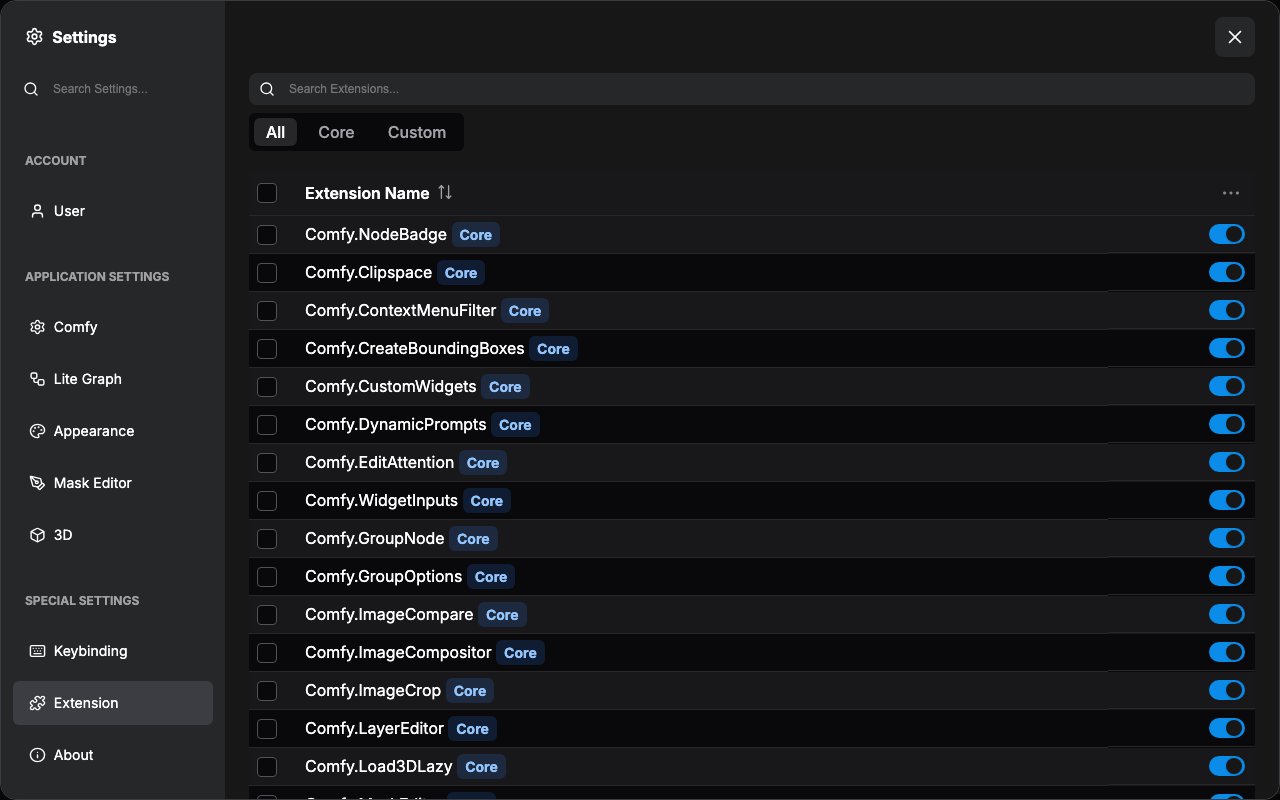 These frontend extension plugins are used to enhance the ComfyUI experience, such as providing shortcuts, settings, UI components, menu items, and other features.
Extension status changes require a page reload to take effect:
## Extension Settings Panel Features
### 1. Extension List Management
Displays all registered extensions in a table, including:
* Extension Name, with a `Core` or `Custom` badge
* Enable/disable status, as a switch on each row
* A checkbox for selecting extensions in batch operations
The **All**, **Core**, and **Custom** buttons above the table filter the list, and the Extension Name column header sorts it.
### 2. Search Functionality
Provides a search box to quickly find specific extensions:
### 3. Enable/Disable Control
Each extension has an independent toggle switch:
### 4. Batch Operations
The ⋮ (More Options) button in the Extension Name column header opens a menu for batch operations:
* Enable Selected, Disable Selected: apply to the extensions selected with the checkboxes
* Enable All extensions, Disable All extensions, Disable Third-Party extensions (keep core extensions): apply to every extension, selected or not
Extensions whose state you changed are listed above the table with a **Reload to apply changes** button.
## Notes
* Extension status changes require a page reload to take effect
* Some core extensions cannot be disabled
* The system will automatically disable known problematic extensions
* Extension settings are automatically saved to the user configuration file
This Extension settings panel is essentially a "frontend plugin manager" that allows users to flexibly control ComfyUI's functional modules.
This documentation is built and hosted on [Mintlify](https://mintlify.com), a developer documentation platform.
These frontend extension plugins are used to enhance the ComfyUI experience, such as providing shortcuts, settings, UI components, menu items, and other features.
Extension status changes require a page reload to take effect:
## Extension Settings Panel Features
### 1. Extension List Management
Displays all registered extensions in a table, including:
* Extension Name, with a `Core` or `Custom` badge
* Enable/disable status, as a switch on each row
* A checkbox for selecting extensions in batch operations
The **All**, **Core**, and **Custom** buttons above the table filter the list, and the Extension Name column header sorts it.
### 2. Search Functionality
Provides a search box to quickly find specific extensions:
### 3. Enable/Disable Control
Each extension has an independent toggle switch:
### 4. Batch Operations
The ⋮ (More Options) button in the Extension Name column header opens a menu for batch operations:
* Enable Selected, Disable Selected: apply to the extensions selected with the checkboxes
* Enable All extensions, Disable All extensions, Disable Third-Party extensions (keep core extensions): apply to every extension, selected or not
Extensions whose state you changed are listed above the table with a **Reload to apply changes** button.
## Notes
* Extension status changes require a page reload to take effect
* Some core extensions cannot be disabled
* The system will automatically disable known problematic extensions
* Extension settings are automatically saved to the user configuration file
This Extension settings panel is essentially a "frontend plugin manager" that allows users to flexibly control ComfyUI's functional modules.
This documentation is built and hosted on [Mintlify](https://mintlify.com), a developer documentation platform.